From Gaming Rig to Dev Rig: My Ryzen 7 Homelab
As a web developer, I’m used to deploying code to the cloud with a few clicks. But a few months ago, I decided to peek behind the curtain. I had an old gaming PC gathering dust, a healthy dose of curiosity, and a goal: to bridge the gap between writing code and understanding the infrastructure it runs on.
Two months in, my Ubuntu homelab has completely changed how I think about development. Here is how I turned old hardware into a powerful dev tool, the challenges I faced, and why every developer should build one.
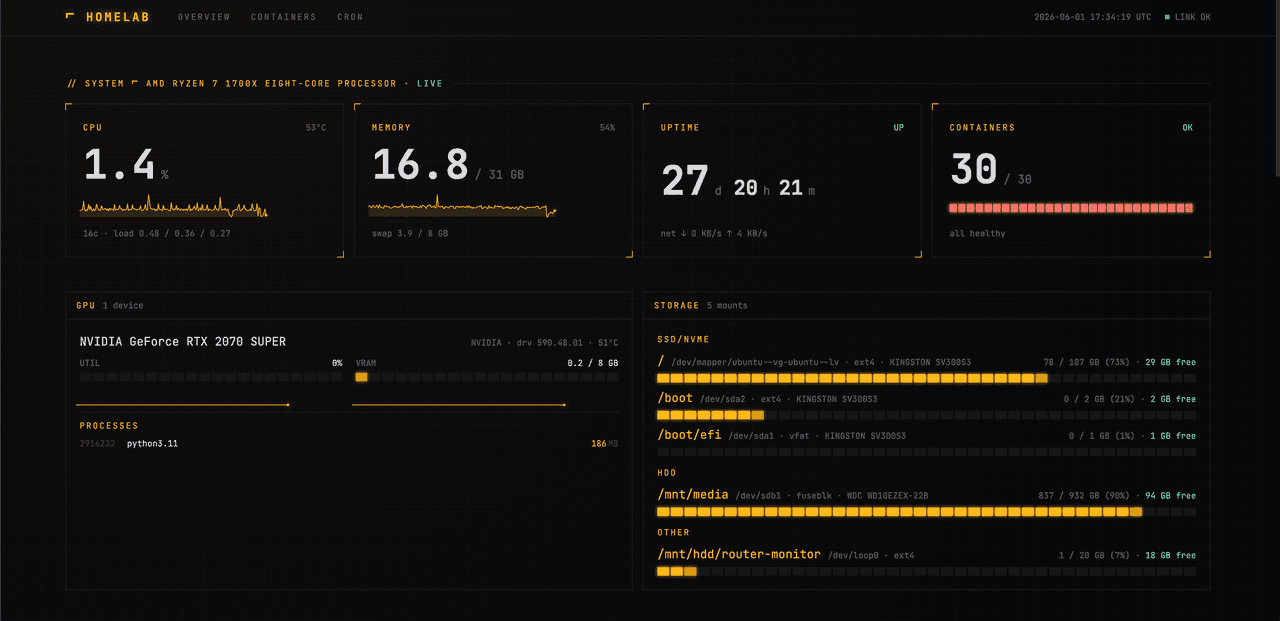
The Hardware: Overkill or Just Right?
Instead of buying a low-powered mini-PC, I repurposed my old gaming setup:
-
CPU: AMD Ryzen 7 1700X (8 cores / 16 threads)
-
RAM: 32GB DDR4
-
GPU: NVIDIA RTX 2070 Super
-
Storage: A tight 128GB SATA SSD (for the OS) + 1TB HDD (for data)
For a basic server, this is complete overkill. But for a developer? It’s a playground. Having 32GB of RAM means I can spin up containers without worrying, and that 2070 Super found a second life hosting a local Qwen3 TTS (Text-to-Speech) model for an AI web app I’m currently building.
The only downside? I can definitely feel the impact on my electricity bill.
The Elephant in the Lab: Why Not a Raspberry Pi 5?
When people talk about homelabs, the Raspberry Pi 5 is usually the default recommendation. I actually have a 16GB Pi 5 sitting around, but I quickly realized it wasn't going to cut it for my goals.
While the Pi 5 is a fantastic little machine for low-power tasks, I wanted a lab that could comfortably handle local AI models.
-
The VRAM Bottleneck: Running an AI model like Qwen3 TTS on a Pi forces it to use the CPU and shared system memory. It’s painfully sluggish. My 2070 Super, on the other hand, has dedicated VRAM and CUDA cores that process tokens almost instantly.
-
The Performance Ceiling: A web application needs low latency. The Pi is great if you want to save on electricity (drawing only about 12W), but you hit a performance wall the second you run heavy container workloads alongside AI inference.
Choosing the "power of x86 and NVIDIA" meant paying a bit more in power, but it guaranteed my development environment never felt laggy.
The "Aha!" Moments: SSH and Portainer
When I first installed Ubuntu Server, the lack of a desktop interface was intimidating. But the moment I configured SSH and realized I could completely control this powerhouse from my main laptop while sitting on the couch, everything clicked.
Since Docker was relatively new to me, I installed Portainer to manage my containers. It gave me a clean visual dashboard to see exactly how my apps, networks, and volumes interact. Seeing containerization happen in real-time on my own hardware made Docker click in a way that cloud tutorials never did.
The Stack: What I'm Running
My homelab balances daily utility with active development projects:
-
Pi-hole: Network-wide ad-blocking that keeps my entire home network clean.
-
Jellyfin: A self-hosted media server for streaming my personal library.
-
Cloudflare Tunnels: This is the magic link for my dev work. It securely exposes my locally hosted Qwen3 TTS model to the public internet, allowing my live web application to use my home GPU for AI workloads without opening dangerous router ports.
Resource Constraints: The 128GB SSD Struggle
It hasn't all been smooth sailing. Operating on an older 128GB SSD means storage management is a constant game of Tetris.
Because all my project repositories live safely on GitHub, I don't treat this machine as a backup NAS. Instead, I’ve had to learn how to strictly separate my data: keeping the OS and active Docker containers on the fast SSD, while routing heavy, persistent storage over to the slower 1TB HDD. It taught me a lot about Linux directory structures and Docker volume mapping.
Solving Real-World Problems (The ISP Logger)
The best thing about a homelab is using it to solve your own problems. Lately, I’ve been having annoying internet drops with my ISP. Instead of just complaining, I built a custom app.
The app runs 24/7 on my homelab, automatically logs into my router, scrapes the logs and network performance data, and saves it into a local database. The next time my internet drops, I won't just have a complaint—I’ll have hard, data-backed evidence to send straight to my ISP.
Conclusion: Connecting the "Red Line"
In the IT world, I’ve always believed in having a wide knowledge base. I call it finding the "Red Line"—the ability to connect different disciplines (frontend, backend, infrastructure, and automation) to see the bigger picture.
Building a Ubuntu homelab didn't just give me a place to host a media server; it gave me context. Understanding how Linux handles permissions, how Docker manages networks, and how web servers operate under the hood has made me a much more well-rounded and confident web developer.
If you have old hardware lying around, stop letting it collect dust. Install Ubuntu, break a few things, and see where the red line takes you.