Our Buzz! buzzers broke, so I turned our phones into them
The family wanted to play Buzz! again. You know the one: four players, a big red button each. But our old cabled controllers had broken.
Then I thought about Kahoot and the Jackbox Party Pack. Everyone just plays on their phone. So why shouldn't you be able to play Buzz! with your phone? Your phone is always with you, and you don't have to worry about old cables breaking.
Scan the TV, become a buzzer
That's what Buzz Party does. It's a Mac app that runs the game in PCSX2, the PS2 emulator, and puts a game picker and a QR code on the TV. Scan the code and your phone turns into a buzzer: the red button on top, then blue, orange, green and yellow, in the same order as the real thing. Up to four players.
The family never sees the emulator. Buzz Party starts it with its own settings, and you browse the games with your phone's buttons, like a console menu.
This is the part I'd show a friend first. You point your phone at the TV, and a second later you're holding a buzzer.
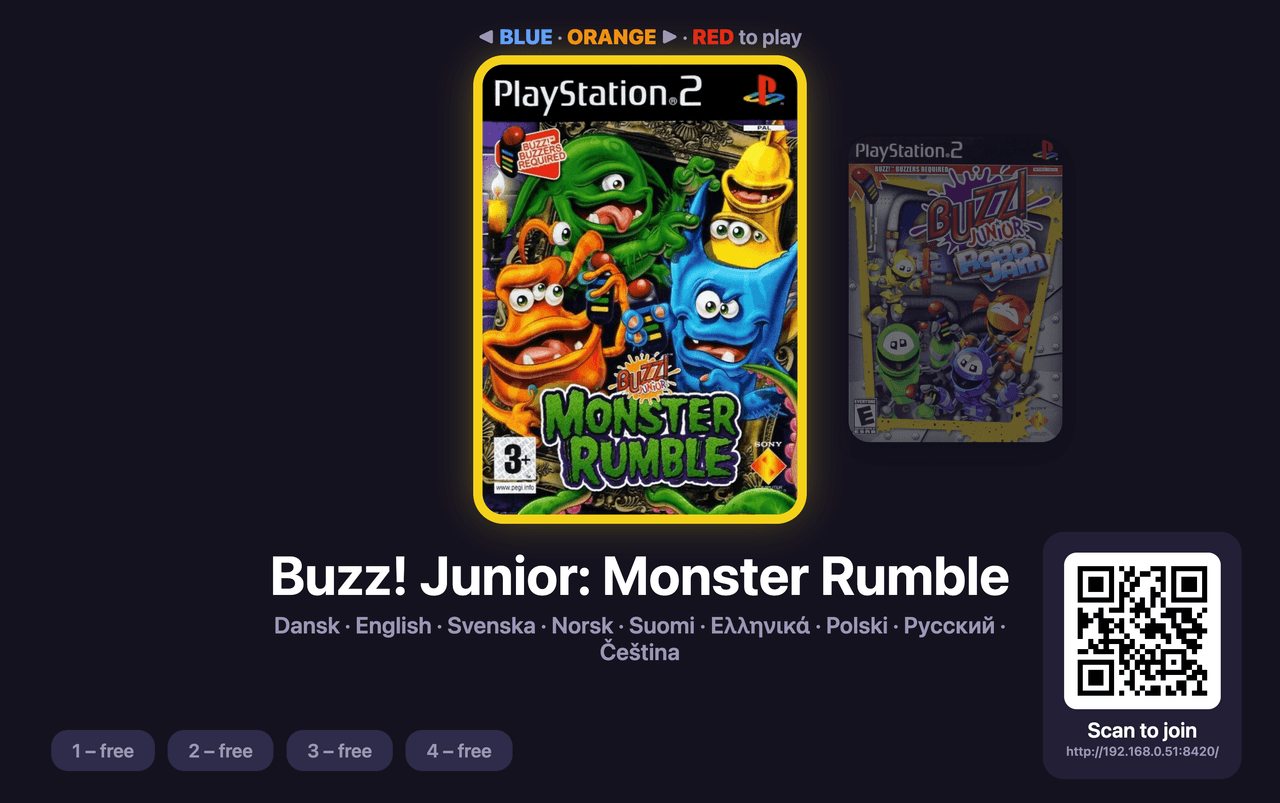
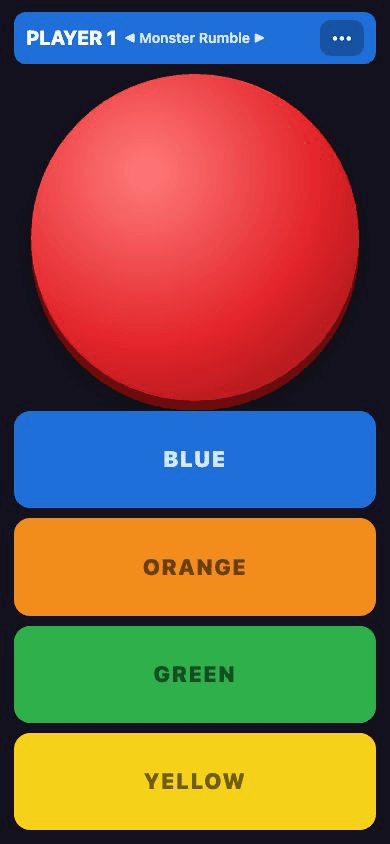
From a phone tap to a PS2 buzzer
The phone page talks to the Mac app over the home Wi-Fi with WebSockets. A small Swift helper turns each press into a key press, and PCSX2 is set up to read those keys as a Buzz! controller (its BuzzDevice on the first USB port). One row of keys per player:
1// One row per player, columns in BUTTONS order.2const KEY_ROWS = {3 1: ['1', 'Q', 'A', 'Z', 'X'],4 2: ['2', 'W', 'S', 'C', 'V'],5 3: ['3', 'E', 'D', 'B', 'N'],6 4: ['4', 'R', 'F', 'G', 'H'],7} as const;
Every press is held down for at least 50 ms, so a quick tap on a phone still counts as a button press in the game. That file is the one place that decides which key is which button, and both the PCSX2 config and the helper read from it.
Phones drop off Wi-Fi, and a phone that disappears mid-press leaves its button held down in the game. Now the app pings every phone every 2 seconds and drops the silent ones. When a phone comes back, it takes its old spot and releases anything the old connection left pressed. A player's spot is kept for 90 seconds before someone else can take it.
Smoother than you'd think
Lag was my biggest worry. A buzzer game is all about who's fastest, so any delay between pressing your phone and the game reacting would ruin it.
So far it feels smoother than you'd think. I've played one mini game with two phones, and it worked fine. What I don't know yet is whether some phones are slower than others. In a game where milliseconds decide who answers first, that matters.
Honest status: v1 works, but the family hasn't played it yet. The real game night is still ahead, on the TV with three or four phones, and that's when I'll find out about the lag.
What's next
First the real game night, and checking how much each phone lags.
Later I'd like to find an old mini PC, put Linux on it and turn it into a kind of PS2 just for Buzz!: turn it on and you go straight to the game picker. I've also been playing with the idea of building custom buzzers, with the hardware inside a 3D-printed case and my own software. Not sure about that one yet. It might be a future project.